Tools & Tips

Why wouldn’t you use a Thermal Printer?

NRG Thermal Printer

If your not using a thermal printer you should be.  Trust us, your shipping life will be never be the same.

Here’s why:

  1. No Toner. No Ribbons.  Be greener and save money!
  2. Printers are sleek and compact…less clutter!
  3. Print labels 10 x faster than a laser printer…save time, be more efficient!
  4. Label rolls are FREE from the major carriers…saving you even more money!

NRG recommends the ZP450 printer – shipped to you for under $200!  Get one today.  Thank us tomorrow.

2018-08-07T20:01:58+00:00September 15th, 2010|General, Tools & Tips|

5 Mistakes Shipping Managers Make…

Shipping managers are people too. That’s right, they also make mistakes. UPS recently published a Compass article listing the top 5 mistakes that shipping managers can make. The list included:

Mistake No. 1: Selecting the wrong service.

Mistake No. 2: Needless address corrections.

Mistake No. 3: Improper packaging.

Mistake No. 4: Not making use of support resources.

Mistake No. 5. Failing to get UPS help with international services.

According to UPS, shipping should be as simple and seamless as possible. If that’s the case, the list seems to be missing another mistake – Mistake No. 6: Not using NRGship to manage your shipping. This would also solve mistake number 2, since NRGship has integrated address validation.

Be sure to check out the full article if you’re making any of these mistakes. They offer up some great tips for you!

2018-08-07T20:21:01+00:00July 8th, 2010|General, Tools & Tips|

Free shipping supplies!

So you’ve got the goods, you’ve picked your carrier….There’s only one thing left. Shipping supplies. Did you know that all of the major carriers offer their users FREE shipping supplies simply by holding an account with them?

UPS
UPS shippers holding a UPS account qualify for free shipping supplies. By simply logging into your My UPS account, you can search and order packaging, labels, air freight supplies and even pre-printed forms.  The best part is that if you use the same supplies over and over, My UPS allows you to easily reorder the supplies you use frequently. All of our NRGship customers also qualify for free labels to use in their thermal or laser printers and are provided with a quick link to order supplies from all of our solutions.

FedEx
Similar to UPS, FedEx also offers their registered users access to free shipping supplies. They provide free shipping of their products and guarantee them to arrive within 2-5 business days.  They also allow shippers to visit any of their local FedEx locations to pick up supplies if they are needed quickly.  Also offered for free are various specialty shipping supplies including COD air waybills, Clinical Pak’s and identifier labels.

USPS
The USPS provides everyone the opportunity to receive free Priority Mail boxes, various shipping forms and Express Mail packaging. You can even get mailing stickers and entire shipping kits at no charge. Visit the USPS Postal Store for more details. USPS packaging, forms and labels can also be ordered for free through Endicia.

Visit your carrier website today for more information on how to get your own free shipping supplies and be on your way to easier shipping!

2018-08-07T20:31:45+00:00June 2nd, 2010|General, Tools & Tips|

Chocolate milk via UPS

I’ve never had to ship chocolate milk but apparently enough people are asking the UPS experts about it to feature the question on their recent list: “Top 10 questions of spring 2010.” Check out their recent posting to learn more about shipping chocolate milk, C.O.D. policies and how to ship your luggage.

We did notice that they were missing one question: “Can you ship from your Mac?” Of course you can!

Top 10 questions of spring 2010

2018-08-07T20:38:32+00:00April 29th, 2010|General, Tools & Tips|

NRGship UPS Pro Simplifies Gift Box Fulfillment

NRGship UPS Pro supports the ability to produce custom label messaging on laser and thermal labels. Order data can be imported from sources like Yahoo! stores can include additional text that customers would like to include on an order, and they will be included on your shipping labels.

Customers who are shipping from FileMaker Pro can easily add this function to their shipping integration by following instructions from our KnowledgeBase article.

Why print gift box labels from one printer and shipping labels from another and risk mixing up the “message” in your fulfillment department? Ship smarter this holiday season with NRGship!

nrgship giftbox

When printing to a thermal printer, the message can be printed out on a doc tab.  These can then be placed onto a gift card that goes inside of the box, and makes for an even more personalized shipment!

2018-08-07T18:28:13+00:00November 20th, 2009|Mac Shipping, Tools & Tips|

USPS Mobile -or- 5 Things I Hate About m.usps.com

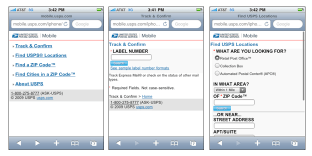
uspsapp

Last week the USPS announced that they are offering a mobile-optimized version of the most popular functions from the usps.com website. While some will appreciate this addition, the implementation of the iPhone specific version is a bit disappointing.

1. No good looking icon for my iPhone home screen! – when you add the web page to your home iPhone, it’s displayed with a generic icon, making it hard to locate amidst all my apps and links. It doesn’t take much effort to create a 57×57 icon named apple-touch-icon.png.

2. No way home! There is always link home at the bottom of the page, but I have to scroll. Make the header image link home please.

3. Bad Form Validation. If I error in form input, it has to reload a page, which is really annoying on a mobile device. Simple client side JavaScript can have been utilized to check for form requirements/errors quickly.

4. Not optimized for the iPhone! There are tons of templates out there, and it’s not hard to create your own. iui or another framework could have been utilized to provide a iPhone-like appearance. At least the address bar could be hidden to provide more screen real estate.

5. The locator function could utilize Geographic Location Classes.

2018-08-07T18:32:58+00:00October 29th, 2009|Tools & Tips|
Go to Top