News + Updates

UPS officially releases iPhone App, touts Mac Support

On the heels of the Apple App Store release last week, UPS posted a press release regarding their UPS Mobile application for the iPhone.

We’ll be posting a full review of UPS Mobile for the iPhone later this week, but it provides a full range of services including shipping, and does not require the user to create a UPS account in order to utilize basic functionality.

Mention is also made of NRGship, our Mac OS compatible desktop shipping application which fully supports UPS technologies.

Ship from UPS.com Address book

Ship from your UPS.com Address book

2018-08-07T20:48:19+00:00November 3rd, 2009|General|

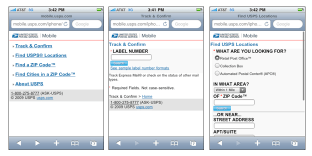
USPS Mobile -or- 5 Things I Hate About m.usps.com

uspsapp

Last week the USPS announced that they are offering a mobile-optimized version of the most popular functions from the usps.com website. While some will appreciate this addition, the implementation of the iPhone specific version is a bit disappointing.

1. No good looking icon for my iPhone home screen! – when you add the web page to your home iPhone, it’s displayed with a generic icon, making it hard to locate amidst all my apps and links. It doesn’t take much effort to create a 57×57 icon named apple-touch-icon.png.

2. No way home! There is always link home at the bottom of the page, but I have to scroll. Make the header image link home please.

3. Bad Form Validation. If I error in form input, it has to reload a page, which is really annoying on a mobile device. Simple client side JavaScript can have been utilized to check for form requirements/errors quickly.

4. Not optimized for the iPhone! There are tons of templates out there, and it’s not hard to create your own. iui or another framework could have been utilized to provide a iPhone-like appearance. At least the address bar could be hidden to provide more screen real estate.

5. The locator function could utilize Geographic Location Classes.

2018-08-07T18:32:58+00:00October 29th, 2009|Tools & Tips|

Eight Great Ideas from the PARCEL Forum

While NRG wasn’t exhibiting at the PARCEL Forum in Chicago last week, we did take a road trip to visit with some of our industry associates.

Mark Taylor, who facilitated the PARCEL Key Executive Forum, just released an article in PARCEL magazine which has eight great tips to reduce transportation costs. We especially like the tip about sending packages with “Hold For Pickup” instead of UPS Early AM as we know some NRGship customers are already doing this to cut costs! Check out our KnowledgeBase for more information on doing “Hold For Pickup” shipments.

2018-08-07T20:51:19+00:00October 14th, 2009|Tools & Tips|

For those that bleed UPS Brown…

Have what it takes to deliver the most UPS express packages on time?

Test your Maximum Driver skills with 2 new games – “Air Drop” and “Laserscape” – at racing.ups.com

We have to admit – it’s kind of fun.  You guide either David Ragan or the UPS Driver through the air or through a maze of lasers. UPS delivers more packages overnight on time in the U.S. than any other carrier – so you’re in for a challenge.

2018-08-07T18:34:36+00:00August 25th, 2009|General|

Stop ReKeying Ship Addresses- Use Enhanced Copy/Paste

For NRGship UPS Mac Pro and FileMaker users who have not integrated shipping, the software features enhanced copy/paste as a quick alternative to retyping or copying addresses line by line.

Easily paste a complete address from a web page, an email, your Ecommerce system or from another Mac application such as Quickbooks, MYOB, Lightspeed or Daylight.

Simply copy any address to your clipboard, create a new shipment and use the ⌘ 8 command and depending on the address format – it will populate all of your address fields as shown below:

2018-08-07T18:35:10+00:00July 2nd, 2009|Mac Shipping, Tools & Tips|

Customer Spotlight – AOV, Inc.

We just wanted to share this email we received from AOV, Inc. – a Boulder, CO based company who provides high quality screen printing, embroidery, and promotional products.

Andy:

We just shipped 24 boxes in one transaction (UPS normally limits this to 20 boxes when you do it online).

Outside of the annoying 10 seconds it took to spool the labels, hit our Purchasing table, link the purchase to the inventory record and the job and capture the tracking number… it worked flawlessly. I was comforted by the fact that this would have probably taken 15 minutes if I had done it the “old fashioned” way.

:-)

Marc

2018-08-07T18:36:04+00:00July 1st, 2009|Case Studies|
Go to Top