AndyKnas

About AndyKnas

Owner at NRG Software

NRGship Pro for FedEx adds additional return options

NRG Software is excited to announced that NRGship Pro for FedEx now supports two additional return label options in additon to the existing print & return option.

The first option is FedEx Call Tags. When you submit a call tag request, a FedEx driver will be dispatched to pickup the package and provide a printed label for the package. With this option your customer does not have to have access to the internet or a printer as FedEx will provide the shipping label.

The second option is an Email Return Label. With email returns, your customer will receive an email with a link where they can print a label for the package. In addition, they can take the package to a FedEx shipping location like FedEx Office or Walgreens and show a barcode in the email and the location can print out the shipping label for them.

Please contact NRG Software if you need assistance in upgrading your application or integrating return labels with FileMaker Pro.

2023-02-24T21:38:08+00:00September 1st, 2021|FileMaker Shipping, Mac Shipping|

Here’s how to create FileMaker server-side Snapshot Links


Have you tried to create Snapshot Links in your server scripts but they fail when users try to open them? When creating Snapshot Links with server-side scripts, the IP of the host is used to create them which leads to invalid Snapshot Links for clients running outside the local network. Often, the host IP is an internal IP number which is not accessible to the outside world. When these Snapshot Links are emailed to users, they throw an error when they try to open them. Snapshot Links created using the FileMaker Pro application don’t have this issue because the links are built using the host used to access the database file, which should be a fully-qualified domain name (FQDN) if you’re using best practices.

Snippet from a Snapshot Link file showing the internal IP numbers

Using the Data File script steps that have been available since FileMaker 18, you can easily read in the Snapshot Link file, replace the IP number for 127.0.0.1, and then send the Snapshot Link in an email from a server script.

In the sample script below, we first go to the proper layout, record and sort order that we want the user to be on when they open the Snapshot Link. We then save the Snapshot Link. Once saved, we open the file and read the contents. The contents then have a simple subsitute to replace 127.0.0.1 with the valid FQDN of the host. We then write the file back to disk and send it out as an email attachment. Problem solved!

Using FileMaker Data File script steps to fix the Snapshot Link file

NRG Software has utilized Snapshot Links to automate server-side reminders for common business needs like Reorder Emails, CRM follow-ups, etc. Please contact us if you’d like to discuss adding server-side automation to your FileMaker Pro solution.


2023-03-07T23:01:36+00:00August 26th, 2021|FileMaker Tips, General|

InsureShield™ Shipping Insurance vs Carrier Liability: What’s the difference?


You’ve heard about InsureShield™ shipping insurance, but may be wondering how it differs from standard carrier liability.

The short answer, it’s a night and day difference.

Carrier liability is the standard liability offered by the carrier for a shipment, in the event of loss or damage (e.g. up to $100 for small package, or $25/lb. for LTL). Excess liability is excess-value coverage (e.g. more than the carrier’s standard liability), up to the cost of the shipment.

Carrier liability is based on small-print terms and a web of governing statutes, some of which date to the 1930’s. At their core, all the statutes allow carriers to limit their exposure and exempt a variety of situations from their liability.

Here are the key points of differentiation between carrier liability, excess liability and InsureShield shipping insurance offered through UPS Capital.

InsureShield shipping insurance provides coverage beyond carrier liability and excess liability. InsureShield shipping insurance covers the following1:

  • Reimbursement up to the full invoice value of the goods, plus shipping
  • Concealed damage coverage when reported within 90 days
  • Expedited reshipment up to 20% of the insured value of the goods

To learn more or add InsureShield shipping insurance to your account, click here.

1 Information on insurance services and coverage provided by UPS Capital Insurance Agency, Inc.

Insurance Disclaimer

Insurance coverage is underwritten by an authorized insurance company and issued through licensed insurance producers, including UPS Capital Insurance Agency, Inc. (“UPSCIA”), a subsidiary of UPS Capital Corporation (“UPS Capital”). The insurance company, UPSCIA and its licensed affiliates reserve the right to change or cancel the program at any time. You may be offered the opportunity to insure eligible shipments under a policy of insurance (the “Policy”) issued: (i) directly to you; (ii) to UPS Capital; or (iii) to the sender/ publisher of this communication.  Where the Policy is issued to UPS Capital or such sender/publisher, such Policy extends coverage to your eligible shipments, but you are neither an insured nor an additional insured under such Policy. In the event of a loss covered under such Policy, any resulting claim payment shall be directed to you as a loss payee. This information does not in any way alter or amend the terms, limitations or exclusions of the applicable Policy and is intended only as a brief summary. Insurance coverage is not available in all jurisdictions and coverage is governed by the terms, conditions, limitations and exclusions set forth in the applicable Policy.


2023-03-07T23:03:57+00:00August 25th, 2021|General|

NRGship Pro for UPS now supports QuickBooks Online

Recent updates to NRGship Pro for UPS include support for QuickBooks Online. Now you can easily ship from QuickBooks Online with ease from your Mac. Once configured, simply enter an order # to have destination information auto-populated. You can then capture weights from a digital scale and output labels to thermal printer or other device. After shipment, the order will be updated in QuickBooks so that tracking data is displayed for full visibility.  Contact NRG Sales for further information on integration with QuickBooks Online.

Connecting NRGship Pro to QuickBooks Online
How to ship QuickBooks Online invoices from NRGship Pro
2023-02-24T21:38:08+00:00August 23rd, 2021|General, Mac Shipping, Press Releases|

Ship from QuickBooks Online with NRGship for UPS

NRGship has found ways to make it a snap for you to create UPS labels from your invoices or contacts with QuickBooks Online.

NRGship for UPS offers several methods with macOS data detection capability. Learn how you can ship from your QuickBooks Online invoices below or visit NRGship for more helpful tips. NRGship Pro for UPS provides direct intgeration to QuickBooks Online invoices for even quicker shipping.

Quickly ship QuickBooks Online invoices with NRGship for UPS
2023-02-24T21:38:08+00:00August 23rd, 2021|Mac Shipping, Tools & Tips|

Ship from QuickBooks for Mac with NRGship

While there are no directly integrated shipping options from QuickBooks for Mac, NRGship has found ways to make it a snap for you to create UPS labels from your invoices or contacts.

NRGship for UPS offers several methods with macOS data detection capability. Learn how you can ship from your QuickBooks invoices below or visit NRGship for more helpful tips. NRGship Pro for UPS provides direct intgeration to QuickBooks Online invoices for even quicker shipping.


Quickly ship from a QuickBooks invoice
Sync your QuickBooks customers to the macOS Address Book
2023-02-24T21:38:08+00:00August 23rd, 2021|Mac Shipping, Tools & Tips|

Updating FileMaker data with Zebra mobile devices


We were recently working on a project where we needed to verify order fulfillment and staging prior to pickup by the shipping carriers.

In most instances, we’d use FileMaker Go on an iPod Touch or iPad for mobile users, but this project required that we scan barcodes quickly for optimum performance.

As a proof of concept, we created a simple FileMaker Web Direct interface so that staff could scan boxes as they were packed, and before they were put onto a pallet. The Zebra TC20 is an Android 8.1 device that accesses Web Direct with it’s Chrome browser thru a wireless connection. The TC20 is ruggedized and features a built-in barode scanner which is perfect for use in a warehouse environment.

In the video below, you can see how this streamlined interface works. The user can choose from two scanning modes – one to verify packing and the other to mark which pallet the package is on awaiting pickup. We used just a single field for barcode scanning to reduce the overall complexity.

One option we considered was using FileMaker Go on an iPod Touch or iPad. We decided not to go this route for a variety of reasons:

  • Scanning with a Zebra handheld is significantly faster than using a handheld barcode scanner or iOS camera
  • Scanning barcodes is trickier with multiple appearing on the package. We wanted to reduce the chance of false-scans using the camera on the mobile device
  • External barcode scanners on iOS can be clunky to use. With the Zebra it’s one device to manage.
  • Using the the iPod Touch or iPad would require a ruggedized case
  • There’s greater chance of loss of device with an iPod Touch or iPad with seasonal staff
  • Using a iPod Touch sled like the Linea Pro adds considerable cost and requires the use of custom plugins along with the iOS App SDK.

Another alternative to using Web Direct is building a native web app that communicates with the FileMaker backend using the Data API to update order status.

Please contact our Sales Department for further information if you’d like help creating a mobile warehouse solution.


2023-12-11T21:24:01+00:00July 27th, 2021|FileMaker Shipping, FileMaker Tips, General, Tools & Tips|

Let’s look at a Claris Connect flow for Shopify Shipping


One of the features Claris touts is the ability to create UPS labels thru their Claris Connect product. While appropriate for some basic use cases, their workflow for performing shipping has some serious limitations. Let’s talk about the Claris Connect flow in this graphic.

The process of creating an order in FileMaker from Shopify makes sense if you have inventory already in FileMaker and would like to make sure you have proper quantities available, or you have need to have all orders inside FileMaker. However, if you were using Shopify and were doing basic shipping, it’s likely that you would already be using intergrated shipping inside of Shopify instead of some alternate solution like Claris Connect.

The remainder of the flow shown is incorrect. In order to create a label you need to know the weight of the box and package dimensions. Most often the ecommerce system will determine shipping rates based on product weight, but it doesn’t include things like packaging and dimensions which can increase cost. If you create a label with the wrong weight you’re going to incur additional surcharges down the line, after the customer has been charged for shipping.. Next, you would not create a label and then send an alert to order processing, as you’d process an order before shipping. Lastly, Claris Connect doesn’t have the ability to update a Shopify order which is criticial to completing order fulfillment.

There are also a number of deficiencies in Claris Connect and it’s connectors, for example:

  • UPS shipping in Claris Connect supports single packages only
  • UPS shipping in Claris Connect doesn’t support alternate origins for drop and blind shipping
  • UPS shipping in Claris Connect doesn’t allows for passing of a recipient phone number (for delivery issues)
  • UPS shipping in Claris Connect doesn’t support any special services like signature required, insured value or Carbon Neutral indicators
  • UPS shipping in Claris Connect only returns published rates
  • UPS shipping in Claris Connect requires package dimensions
  • UPS shipping in Claris Connect doesn’t support international documentation
  • UPS shipping in Claris Connect doesn’t support third-party billing
  • UPS shipping in Claris Connect doesn’t support QuantumView Notifications
  • Claris Connect cannot update the order status or track number in Shopify after shipment

NRGship UPS for FileMaker is the only carrier-certified solution that provides the complete suite of UPS shipping functionality including address validation, rating, shipping, tracking and pickup requests from FileMaker Pro with compatability with hardware your shipping department has like thermal printers and digital scales. We also offer solutions for FedEx, USPS and multi-carrier.

This is how we’d envision the correct flow with shipping from Shopify using FileMaker Pro:

  • FileMaker Pro connects to Shopify via API and downloads new orders [fmEcommerce Link (Shopify Edition) is a great option if you don’t want to code your own]
  • Orders are created in your FileMaker System
  • Pick slips are printed or displayed on an iPad for new orders
  • Picked orders are packaged
  • Shipping labels are created using NRGship integrated to the order system
  • After shipment, order status and tracking is updated in the order system and Shopify via API

NRG Software has performed numerous integrations with Shopify and other ecommerce solutions specific to workflow. NRGship itself has built-in Shopify integration so that you can seamlessly download orders into NRGship and perform order fulfillment. Please contact us if you’d like to discuss seamless order fulfillment from FileMaker Pro.


2023-03-07T23:09:13+00:00July 13th, 2021|FileMaker Shipping|

NRGship is Compatible with FileMaker Pro v19.3

NRG Software is excited to announced that current builds of all NRGship solutions are compatible with the Claris FileMaker Pro v19.3 release that has been optimized for Apple silicon computers. Internal testing has not uncovered any issues. As with any upgrade, we suggest customers test their integration before upgrading production systems. Customers using NRG Ship Connect should email sales@nrgsoft.com for upgrade information.

More information on upgrading NRGship for FileMaker can be found here.

2023-05-20T03:04:43+00:00June 24th, 2021|FileMaker Shipping, General|

Who uses serial scales?


I was recently on a west coast virtual meetup event and there was a discussion about plugins and someone chimed in asking “who uses serial scales?” (or something like that…) With 20+ years of experience working with Claris FileMaker Pro customers in a warehouse, it’s fairly common for us to interface with these devices.

First off, scales used on a shop floor are very industrial and expensive. The Mettler Toledo PS60 looks to be bomb-proof and costs over $500. While current PS60’s have a USB interface, older models rely on the trusty serial protocol. We recently did a shipping integration where a customer had a flashy new dimensionalizer (that cost thousands of dollars) with a serial interface.

Mettler Toledo PS60

Talking to Serial Scales from FileMaker Pro

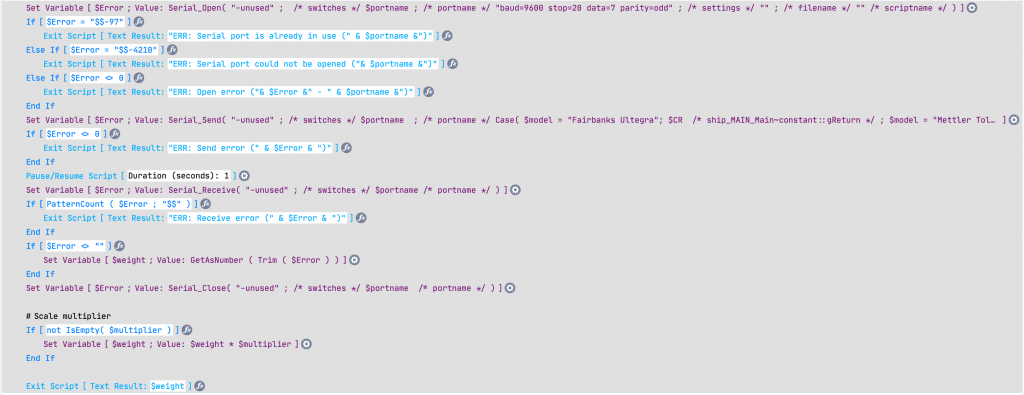
Interfacing with a serial scale from FileMaker Pro is easiest with a plugin like MBS or Troi Serial. Both work equally well for this use case. In the scripts below we go thru a simple process – we open a serial port, we then send some data to the device (based on device spec, some require a CR/LF or some other characters), then we receive a response back. Some scales return fractional values so we then apply a modifier as needed to get a proper weight in pounds.


Capturing the weight with MBS
Capturing the weight with Troi Serial

Note that on the Mac, you need to have an adapter for a serial scale. The preferred Tripp-Lite/Keyspan USA19-HS adapter requires drivers which will not work with macOS Big Sur. There are some serial to Bluetooth adapters which will provide connectivity for macOS.

The Keyspan USA19-HS Adapter

But what if you don’t like plugins? If you’re in the mood for a science project, you could build a microservice with a Raspberry Pi that communicates with a serial or USB scale, but then exposes it to FileMaker thru CURL. But why waste time when using a plugin is so simple?

If you don’t like science, another alternative is PrintNode, a paid service that installs on your desktop and provides an interface to scales (and printers) thru HTTP requests. PrintNode requires a bit of setup and configuration but is very powerul. One benefit of PrintNode is you can then capture weights using your app with FileMaker Go or FileMaker WebDirect. This opens a whole new world to mobile warehousing.

Alternatives to Serial Scales

Some USB scales are simply serial devices with a USB adapter. When you look at them from the operating system, they require a driver and show as a COM port or some variant. Other USB scales act as HID devices and require special applications to communicate with them using a USB vendor and product ID. We’ve found that dimensionalizers have the ability to communicate over IP using simple HTTP requests.

NRGship solutions for FileMaker have the ability to communicate with scales using serial, HID, PrintNode or IP. NRGship allows you to quickly integrate UPS, FedEx, USPS and LTL validation, rating and shipping into your app.

Please contact our Sales Department for further information if you need help communicating with scales from your own FileMaker Pro app.


2023-03-07T23:17:30+00:00May 26th, 2021|FileMaker Shipping, FileMaker Tips, General|
Go to Top