FileMaker Shipping

Who uses serial scales?


I was recently on a west coast virtual meetup event and there was a discussion about plugins and someone chimed in asking “who uses serial scales?” (or something like that…) With 20+ years of experience working with Claris FileMaker Pro customers in a warehouse, it’s fairly common for us to interface with these devices.

First off, scales used on a shop floor are very industrial and expensive. The Mettler Toledo PS60 looks to be bomb-proof and costs over $500. While current PS60’s have a USB interface, older models rely on the trusty serial protocol. We recently did a shipping integration where a customer had a flashy new dimensionalizer (that cost thousands of dollars) with a serial interface.

Mettler Toledo PS60

Talking to Serial Scales from FileMaker Pro

Interfacing with a serial scale from FileMaker Pro is easiest with a plugin like MBS or Troi Serial. Both work equally well for this use case. In the scripts below we go thru a simple process – we open a serial port, we then send some data to the device (based on device spec, some require a CR/LF or some other characters), then we receive a response back. Some scales return fractional values so we then apply a modifier as needed to get a proper weight in pounds.

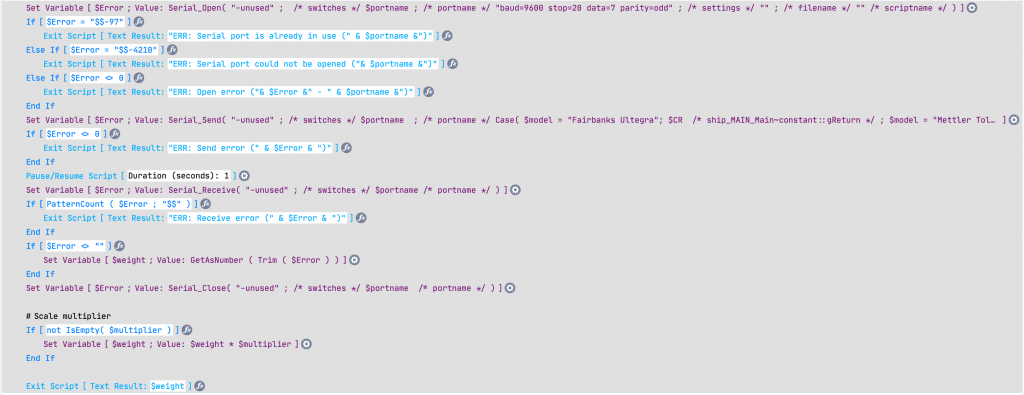
Capturing the weight with MBS
Capturing the weight with Troi Serial

Note that on the Mac, you need to have an adapter for a serial scale. The preferred Tripp-Lite/Keyspan USA19-HS adapter requires drivers which will not work with macOS Big Sur. There are some serial to Bluetooth adapters which will provide connectivity for macOS.

The Keyspan USA19-HS Adapter

But what if you don’t like plugins? If you’re in the mood for a science project, you could build a microservice with a Raspberry Pi that communicates with a serial or USB scale, but then exposes it to FileMaker thru CURL. But why waste time when using a plugin is so simple?

If you don’t like science, another alternative is PrintNode, a paid service that installs on your desktop and provides an interface to scales (and printers) thru HTTP requests. PrintNode requires a bit of setup and configuration but is very powerul. One benefit of PrintNode is you can then capture weights using your app with FileMaker Go or FileMaker WebDirect. This opens a whole new world to mobile warehousing.

Alternatives to Serial Scales

Some USB scales are simply serial devices with a USB adapter. When you look at them from the operating system, they require a driver and show as a COM port or some variant. Other USB scales act as HID devices and require special applications to communicate with them using a USB vendor and product ID. We’ve found that dimensionalizers have the ability to communicate over IP using simple HTTP requests.

NRGship solutions for FileMaker have the ability to communicate with scales using serial, HID, PrintNode or IP. NRGship allows you to quickly integrate UPS, FedEx, USPS and LTL validation, rating and shipping into your app.

Please contact our Sales Department for further information if you need help communicating with scales from your own FileMaker Pro app.


2023-03-07T23:17:30+00:00May 26th, 2021|FileMaker Shipping, FileMaker Tips, General|

What’s the best way to ship from FileMaker Pro?


With NRGship and FileMaker Pro you have two options for shipping and choosing between them often depends on what makes sense for your workflow.

Integrated shipping is our preferred method and it allows you to utilize the full capabilites of NRGship across your organization on the desktop or iOS. We often suggest that things start during order entry with address validation. This ensures that the recipient information is correct before the order ever hits your shipping department, and allows you to have a clean address in your backend CRM for future use. From your order, it’s easy to add simple rating functionality based on the content of your order so that you can charge your customer based on the estimate, or provide expedited service options based on a certain delivery date. Once the order has shipped, cost information can be returned back to the order along with the tracking number. The tracking number then provides visibility right on the order without having to check the carrier software or website. With integrated shipping you can seamlessly utilize the power of your shipping carriers without ever leaving your own database.

https://youtu.be/y7o53YzIviI
Overview: Integrated Shipping

Keyed shipping most closely resembles the process you would have using carrier software integrated with FileMaker. You would key in an order number and the data would appear in the shipment. The shipping staff then adds packages, validates the address, runs rates and produces the shipping label. After shipment, the cost information is returned back to your order so that you have visibility across your organization. Since NRGship is built with FileMaker Pro, you can leverage it’s functionality to provide far more complex shipping than you could with the carrier software alone.

https://youtu.be/f9Hk539Ho3A

NRGship is a Carrier Certfied provider that powers hundreds of businesses who ship UPS, FedEx and USPS with FileMaker Pro without the need to setup external services or perform complex API coding. Contact our sales staff to setup a time for a demo of NRGship and see how it can improve your entire business.


2023-07-19T05:09:49+00:00March 26th, 2021|FileMaker Shipping, Tools & Tips|

NRGship Pro for UPS update adds requested features


The Q1 2021 update of NRGship Pro for UPS includes two new features requested by customers. Favorites allow you to save common shipments for repeat shipping which can greatly simplify complex multipackage or international shipments. The continuity camera allows you to use an iOS device to add a photo of your shipment so that you can capture what was placed into a package. Please watch the videos below for a brief overview of these new features.


2023-03-07T05:54:59+00:00March 26th, 2021|FileMaker Shipping, Mac Shipping|

How to process USMCA shipments with NRGship

This article is current as of July 2020. It will be updated as we receive new information from our carrier partners.


As of July 1st, 2020, the United States-Mexico-Canada Agreement (USMCA) will replace the North American Free Trade Agreement (NAFTA). Some shipments that cross the borders of these countries may require special import forms.

For USMCA details and forms, go to the U.S. Customs and Border Protection USMCA page. For NAFTA information, go to the U.S. Customs and Border Protection NAFTA page.

UPS

Currently the UPS Developer Kit APIs do not support the new USMCA forms for automated processing.  You will need to produce your own USMCA forms and apply them to the outside of packages. You can find more information on USMCA and a sample form for UPS shipments using this link.

FedEx

Currently the FedEx Shipment APIs do not support the new USMCA forms for automated processing.  You will need to produce your own USMCA forms and apply them to the outside of packages. You can find more information on USMCA and a sample form for FedEx shipments using this link. We are working on an update where you can attach a PDF version of the FedEx form to your shipment.


2020-07-30T10:54:44+00:00July 30th, 2020|FileMaker Shipping, Mac Shipping, Tools & Tips|

Claris Engage 2020

Claris Engage 2020 is around the corner. It’s different than what they envisioned, their first ever virtual conference experience, as they honor 25 years of community and collaboration. Over two days they will discuss topics such as Driving Customers towards Modern Design Excellence, Developers Making a Difference and Looking Ahead to Emerging Technology.

Please register today if you haven’t already since space may be limited for some sessions. Then join us on August 4 and 5 as we connect with the Claris Community, meet the Claris leadership team, and learn about the future of digital transformation. Browse the two-day schedule and featured speaker bios now, and register to reserve your seat for any sessions you’d like to attend.

Don’t forget the conference is virtual and free to attend, so please sign up for #ClarisEngage2020 soon: https://community.claris.com/en/s/engage

We will miss chatting with our customers at this event but are making available our Trade Show Kit upon request.

NRG will also be holding our weekly FileMaker Integration Demo at 11:30a PST on Wednesday August 5th.

2020-07-20T14:27:40+00:00July 20th, 2020|FileMaker Shipping, General|

NRGship is Compatible with FileMaker Pro v19

NRG Software is excited to announced that the current release of all NRGship solutions are compatible with the FileMaker Pro v19 platform. Internal testing has not uncovered any issues. As with any upgrade, we suggest customers test their integration before upgrading production systems. Customers using NRG Ship Connect should email sales@nrgsoft.com for upgrade information.

More information on upgrading NRGship for FileMaker can be found here.

2023-05-20T03:06:35+00:00May 21st, 2020|FileMaker Shipping, General|

Carrier Updates amid COVID-19

Due to the ongoing COVID-19 situation, a number of temporary changes are in effect to our partner carriers’ services. We’re providing a brief overview of the changes here, as well as links to the most complete and up-to-date information available.


UPS

UPS

UPS service continues except in cases limited by government restrictions. Transit time is not expected to be affected in the majority of cases. However, the UPS Service Guarantee (UPS Money Back Guarantee) is suspended.

FedEx

FedEx

FedEx is continuing to deliver packages. Signature required is temporarily suspended for most deliveries in the United States, except for shipments with adult signature required.

FedEx has suspended our money-back guarantee for all FedEx Express, FedEx Ground, FedEx Freight and FedEx Office services effective immediately until further notice.

A number of locations are subject to temporary service suspensions and delays. Please see FedEx’s service impact information link for detailed, up-to-date information.

Effective April 6th, all FedEx Express international parcel and freight shipments will be subject to a temporary surcharge.

USPS

USPS

The USPS has announced numerous suspensions and delays in service, as well as suspensions of the guarantee on Priority Mail Express International. Please refer to their service alerts page for more information regarding country-specific policies.

2020-04-02T13:26:10+00:00April 2nd, 2020|FileMaker Shipping, Mac Shipping, Press Releases|

Using NRGship with PrintNode

Current releases of all NRGship Pro products for desktop and FileMaker Pro include a feature that allows for printing to remote thermal printers using PrintNode. This can come in handy if you are working remote and want to print labels to a printer in a warehouse used for fulfillment, or if you’re working in a workgroup setting and want to share a thermal printer that does not have built-in networking. First you will need to create a PrintNode account and then install the PrintNode application on the workstation that has the thermal printer connected. Afterwards you can go into NRGship preferences and drop in your API Key so that you’ll be able to select the printer thru the Advanced Printing.

PrintNode is free for up to 50 prints per month, while paid accounts with up to 5,000 prints start at $9.

PrintNode also works great for workstations running NRGship with FileMaker Pro in a Windows Terminal Server session, or for printing to a thermal printer via FileMaker Go or Web Direct.

Please contact NRG support if you need any assistance with PrintNode setup.


2023-03-07T22:05:31+00:00April 2nd, 2020|FileMaker Shipping, General, Mac Shipping|

NRGship Pro for FedEx supports FedEx One Rate®

FedEx One Rate® is a service offering from FedEx where regardless of package weight, you pay the same shipping rate with premium services. In NRGship you simply pick a One Rate packaging option and when you get rates you will see the same rate regardless of weight. You can switch back to standard packaging to see all rates based on the package weight.

2020-01-03T11:07:08+00:00January 3rd, 2020|FileMaker Shipping, General, Mac Shipping|
Go to Top