General

NRGship is Compatible with FileMaker Pro v19.3

NRG Software is excited to announced that current builds of all NRGship solutions are compatible with the Claris FileMaker Pro v19.3 release that has been optimized for Apple silicon computers. Internal testing has not uncovered any issues. As with any upgrade, we suggest customers test their integration before upgrading production systems. Customers using NRG Ship Connect should email sales@nrgsoft.com for upgrade information.

More information on upgrading NRGship for FileMaker can be found here.

2023-05-20T03:04:43+00:00June 24th, 2021|FileMaker Shipping, General|

Who uses serial scales?


I was recently on a west coast virtual meetup event and there was a discussion about plugins and someone chimed in asking “who uses serial scales?” (or something like that…) With 20+ years of experience working with Claris FileMaker Pro customers in a warehouse, it’s fairly common for us to interface with these devices.

First off, scales used on a shop floor are very industrial and expensive. The Mettler Toledo PS60 looks to be bomb-proof and costs over $500. While current PS60’s have a USB interface, older models rely on the trusty serial protocol. We recently did a shipping integration where a customer had a flashy new dimensionalizer (that cost thousands of dollars) with a serial interface.

Mettler Toledo PS60

Talking to Serial Scales from FileMaker Pro

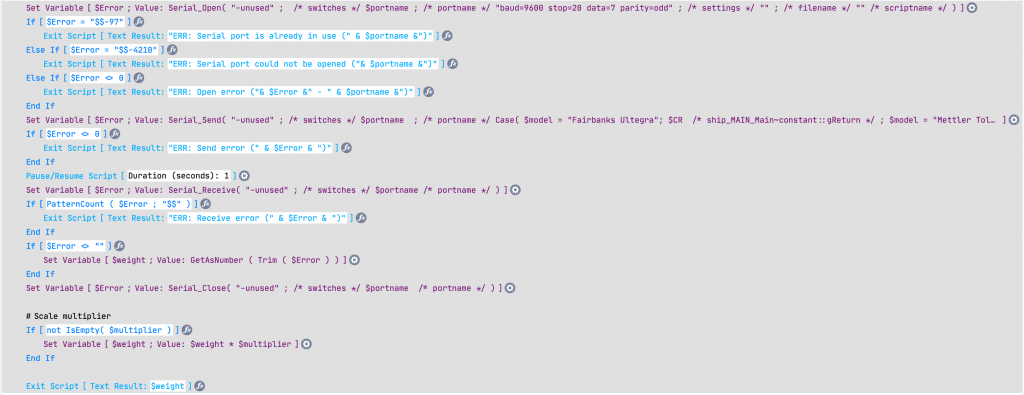
Interfacing with a serial scale from FileMaker Pro is easiest with a plugin like MBS or Troi Serial. Both work equally well for this use case. In the scripts below we go thru a simple process – we open a serial port, we then send some data to the device (based on device spec, some require a CR/LF or some other characters), then we receive a response back. Some scales return fractional values so we then apply a modifier as needed to get a proper weight in pounds.


Capturing the weight with MBS
Capturing the weight with Troi Serial

Note that on the Mac, you need to have an adapter for a serial scale. The preferred Tripp-Lite/Keyspan USA19-HS adapter requires drivers which will not work with macOS Big Sur. There are some serial to Bluetooth adapters which will provide connectivity for macOS.

The Keyspan USA19-HS Adapter

But what if you don’t like plugins? If you’re in the mood for a science project, you could build a microservice with a Raspberry Pi that communicates with a serial or USB scale, but then exposes it to FileMaker thru CURL. But why waste time when using a plugin is so simple?

If you don’t like science, another alternative is PrintNode, a paid service that installs on your desktop and provides an interface to scales (and printers) thru HTTP requests. PrintNode requires a bit of setup and configuration but is very powerul. One benefit of PrintNode is you can then capture weights using your app with FileMaker Go or FileMaker WebDirect. This opens a whole new world to mobile warehousing.

Alternatives to Serial Scales

Some USB scales are simply serial devices with a USB adapter. When you look at them from the operating system, they require a driver and show as a COM port or some variant. Other USB scales act as HID devices and require special applications to communicate with them using a USB vendor and product ID. We’ve found that dimensionalizers have the ability to communicate over IP using simple HTTP requests.

NRGship solutions for FileMaker have the ability to communicate with scales using serial, HID, PrintNode or IP. NRGship allows you to quickly integrate UPS, FedEx, USPS and LTL validation, rating and shipping into your app.

Please contact our Sales Department for further information if you need help communicating with scales from your own FileMaker Pro app.


2023-03-07T23:17:30+00:00May 26th, 2021|FileMaker Shipping, FileMaker Tips, General|

Here’s how to get high quality output with thermal printers and FileMaker Pro


Thermal printers like the Zebra GX420d have a command language called Zebra Programming Language (ZPL) which should always be used to provide the highest quality output. While you can print other data to these devices, the quality is severly degraded because it’s essentially printing an image which gets converted to a black and white 200 dpi image. For example, if you were printing a barcode you may incur scanability issues, but it also looks unprofessional due to pixelation. While it’s not hard to create ZPL code, the free FileMaker FM ZPL Helper tool can be used to create templates for thermal labels with ease using a subset of the print language. Once you have the ZPL code, it can be sent to networked Zebra printers very easily. NRG Software provides helper applications for printing to USB connected printers without the need for third party drivers.

Product Labels

We created a UPC label on 2.5×1.25″ label stock as this would be a common type of label to print from FileMaker. The label on the left was printed with ZPL while the label on the right was printed from a FileMaker layout containing text and a container with a barcode image using the macOS driver. The barcode and small text on the right is highly pixelated and is not of the quality you’d want to place on product. One other issue is Page Setup. We’ve found that you need to create the actual label layout smaller than the actual label which leads to wasted space. If you make the layout the actual size with zero margins and keep Page Setup to match the label size you will get blank labels in-between as shown below.

Here is the ZPL code for our SKU label:

^XA^FO0,30^AS,50,^FB800,1,,C,^FDProduct Name^FS
^FO530,90^AS,50,^FB100,4,,C,^FDColor Info $Price^FS
^FO210,90^BY3,,100^BC,100,Y,,,A^FD799033162358^FS^XZ

Once we have the ZPL code, we can do a simple HTTP POST using Insert From URL to output to the Zebra printer as shown in the script below. This simple script can be utilized for printing from FileMaker Pro, FileMaker Go, FileMaker Server or even Web Direct so as long as they are on the same network.

Note that the HTTP POST method above only works with newer networked Zebra printers. Older Zebra printers, Zebra-compatible (ZPL) or those with USB connections require more complex scripting. Printers like the Rollo are compatible with Zebra label rolls but cannot print ZPL code.

Shipping Labels

In this example, the label on the left was created by NRGship UPS for FileMaker using ZPL while the image on the right is a GIF image printed directly to the device thru the OS driver. All of the barcodes are pixelated, which can lead to re-labeling by shipping carriers. Another benefit of Zebra printers for shipping labels is free label stock – both UPS and FedEx provide free labels, whereas proprietary label stock for Dymo printers can be costly.

If you need help printing labels to thermal printers from FileMaker Pro, please contact our Sales Department for further information. We can provide great insight into desktop and portable Zebra printers, label design, and more.


2023-03-07T23:11:21+00:00April 30th, 2021|General|

Automate WordPress content from FileMaker Pro


Recently we did a project where we assisted with editing specific content areas on a WordPress site with data from Claris FileMaker Pro. Rather than adjust the whole web page, we had the Post Snippets for WordPress plugin modified so that their plugin could be accessed via REST API to simplify changing of data.

In this specific use case, our customer runs multiple soup locations and the soup availability changes from day to day. They maintain an internal production schedule in FileMaker Pro so it was only natual to extend their store offerings to be managed using a similar method.

Previously, store staff had to maintain the website manually on a daily basis. Now store staff can login to a WebDirect area where the soup offerings can be scheduled thru a calendar interface into the future for weeks at a time.

On the website itself, the web designer mocked up the site using slugs of data which then get substituted with the dynamic content when viewed.

During the day, the soup market staff can log back in to the web portal and update the offerings for the current day if they run out or need to substitute with a new product. When changes are complete, the website is immediately updated.

Store Managers can also access an admin page on the site to print out internal store signage which pulls pages from WordPress without the header/footer information to display available soups at point of purchase.

In addition, we were able to automate the creation of hundreds of pages in WordPress containing ingredients for each soup. Now, if a recipe changes, the website is updated immediately to reflect the change so the customers can check for any food sensitivity issues.

Please contact our sales department if you’d like to discuss ways that NRG Software can help you automate your WordPress site.


2023-03-07T23:19:08+00:00March 9th, 2021|General|

NRGship Status Notifications

NRGship solutions differ from other products on the market because we dont’ act as a middle-man as part for standard shipping functions like validation, rating, shipping and tracking. NRGship communicates directly with our shipping carrier partners via APIs to reduce potential points of failure for your shipping operation.

As an effort to be fully transparent, NRG Software monitors the carrier APIs using a variety of methods and we encourage our users to signup for notifications of outages to reduce the need to contact NRG if you’re experiencing issues. You can view our status page at https://status.nrgsoft.com


2021-02-20T11:07:59+00:00February 20th, 2021|General|

9th annual FedEx Small Business Grant Contest

You’ve grown stronger and wiser over the last year. And the valuable new lessons you’ve learned have helped you become more focused than ever before. Now you have a chance to win $50,000 to help you continue growing your business. Enter the 9th annual FedEx Small Business Grant Contest today.

Enter Contest

2021-02-19T14:40:29+00:00February 19th, 2021|General|

Meet Cross-Border Demand with Ease

Don’t let customs and regulations stop you from growing internationally. In today’s business climate, expanding your customer base is essential. That means shipping across borders to fulfill growing demand. The time to export is now, for a number of reasons. Watch our Global E-Commerce webinar and learn from business owners who successfully made the jump.

Watch the Webinar

2021-02-19T14:36:48+00:00February 19th, 2021|General|

How to turn today’s megatrends into tomorrow’s advantages: Register NOW for this UPS event on November 12

November 12
Thursday, 1:00 p.m. EST
Sign up now for the final webinar in our Be Unstoppable™ series: Five Megatrends Impacting Your Small Business.

Our experts, Erik Stephansson, UPS Director of Market Research and Global Customer Insights, Ayana Green, UPS Vice President of U.S. Marketing, Vignesh Anandan, UPS Senior Marketing Manager of Global Customer Insights, and Archana Vidyasekar, Research Director at Frost & Sullivan’s Visionary Innovation Group, will share results from our recent survey about the megatrends transforming small business today, along with actions your business can start taking to:

  • Gain more customers
  • Streamline your supply chain
  • Become more competitive
  • Reduce business risks

We’ll also talk about UPS solutions that can help your business thrive as you adjust to these accelerating trends.


Register Now

2020-11-10T10:59:45+00:00November 10th, 2020|General|

Let us help you harness the power of APIs with Claris FileMaker Pro

While our primary development efforts at NRG revolve around shipping and carrier APIs, we often assist other Claris developers with projects related to other APIs. With our knowledge of XML and JSON creation and parsing, we can often provide assistance to jumpstart web service integrations and save you considerable time and effort. Contact our sales department for more information on our development services.

ShipStation APIs

We recently did a projet where a customer was implementing NRGship for Endicial Label Server to replace label generation thru ShipStation. The customer wanted to maintain their existing multi-channel order downloads in ShipStation for the time being, but wanted more finite control over label generation from FileMaker which we were able to quickly add to their solution. Their existing workflow consisted of manually downloading orders (TXT) from ShipStation and importing into their FileMaker ERP each day. The ShipStation order download only provided limited data. In order to update tracking information in ShipStation, we needed the order’s internal ID which was not provided in the download. By implementing ShipStation APIs to search for orders, we were able to get the internal ID, and afterwards utilize that ID to update the order and add the appropriate tracking information. We later added code to download orders directly from ShipStation to remove the manual process.

Acuity Scheduling

We responded to a post on FaceBook where a member of the FileMaker community was looking to access their appointment data from the web based Accuity Scheduling system from their FileMaker database. We created a simple database using Insert from URL that would query appointment data and then add or update records in the FileMaker table based on the query result. In addition, another function was created to download client data from Accuity so that it could be used as a Source of Truth for customer information.

Veryfi Invoice Data

We helped another developer who was looking to utlilize the Veryfi API to extract data from PDF invoices. We built scripts which would encode and upload a PDF document from a container field, and then parse out the invoice and line item data from the JSON into FileMaker records.

2020-10-04T11:28:42+00:00October 4th, 2020|Case Studies, General|
Go to Top